
TypingClub has changed a lot since I last used it — it now sits fully under the edclub umbrella — but the essentials remain the same. It’s still free, easy to use, and one of the most accessible touch‑typing programs available. You can even log in with a Google account, which saves you from yet another password.
TypingClub is edclub
The original TypingClub lessons now form part of edclub’s wider catalogue of cross‑curricular typing‑based courses, including:
- Typing
- Vocabulary & Spelling (SPaG/GPS)
- Digital Citizenship (PSHE)
- Social Emotional Learning (SEMH)
- Reading
- Financial Literacy
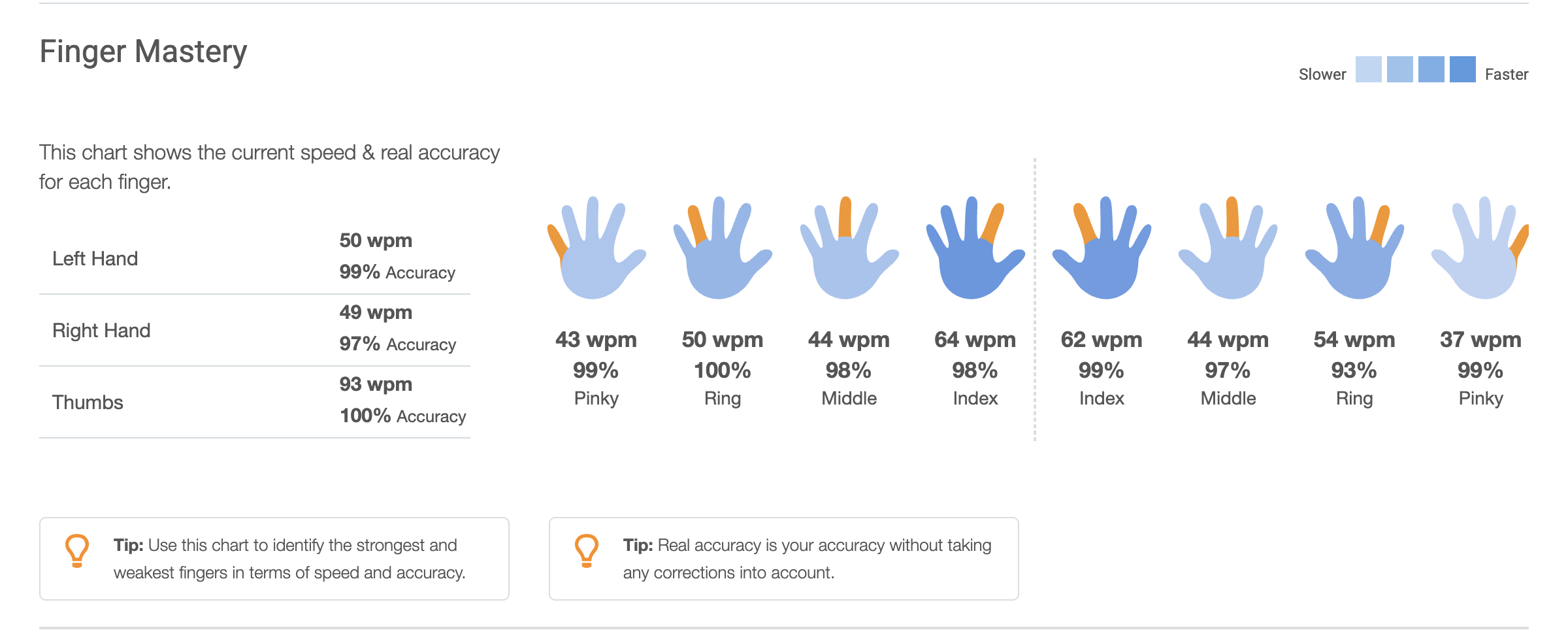
Typing remains the core focus, and the classic strengths are still here: speed and accuracy tracking, finger‑strength metrics (my pinkies remain the weakest links), daily practice logs, gamified badges, and mini‑games.
Themed Typing Courses
The themed typing catalogue now includes sight words, fiction, foreign languages, and Greek & Latin roots. (If you’re teaching classics, I have a range of Greek & Latin resources available on TPT.)
There are DVORAK and one‑handed typing courses too, which is a great accessibility addition to the usual QWERTY lessons.
I tested the Greek & Latin Roots (Level 7) course and loved the mix of audio stories, vocabulary, typing drills, and puzzles. I tried Typing Fun Facts as well, which was unexpectedly challenging thanks to all the number typing — never my forte without a numpad. Everything still has the classic clicky sound effects and hand guides.
School Edition vs Premium
TypingClub is available to both schools and individuals, with free and premium options. You can explore the TypingClub School Edition if you’re setting it up for a class or homeschool.
The free School Edition includes up to 3 classes, 2 teachers, and unlimited students. Premium unlocks unlimited classes and teachers, removes adverts, and adds features like custom lesson creation.
It’s ideal for primary school teachers and homeschoolers. Secondary school subject teachers, who often manage many classes, really need the paid version for full functionality.
Touch Typing Still Matters
Touch typing isn’t taught in most schools anymore, but it’s an essential everyday skill to me — writing documents, messaging, searching, everything. I learned on ancient school computers and the classic Mavis Beacon, and I’ve never regretted it.
If you’re teaching typing, I have a QWERTY typing packet available on TPT, covering hand placement, drills, and worksheets.
If you’re willing to practise and motivated to learn, TypingClub (edclub) remains one of the best ways to pick up this practical skill. There’s more to a keyboard than WASD gaming — and this is the perfect app to teach anyone, at any age.
Comments